Key takeaways
- General AI assistants are good at drafting, summarising, rewording and organising. They are poor at facts they cannot see, such as the current wording of a standard or a clause number.
- The biggest time savings for small builders are in paperwork: variations, site diary entries from voice notes, client emails, quotes, tender responses and meeting notes.
- Never rely on AI for a building code requirement, clause number or engineering value without checking the source document yourself. AI tools can state wrong figures with complete confidence.
- Safety documents drafted with AI must still be specific to the job, reviewed by someone competent and consulted with the workers doing the work.
- Check what happens to data you paste in. Client details, contracts and plans may be confidential, and privacy obligations still apply.
Most builders did not get into the trade to write emails. Yet a surprising share of a small builder’s week goes on paperwork: quotes, variations, site diaries, client updates, supplier emails, safety documents and invoices. It is also where AI tools, the chat-based assistants that became mainstream over the last few years, genuinely save time.
AI will not build a house, check a slab or talk down an angry client on site. But used sensibly, it can take a lot of the typing out of running a building business. Used carelessly, it can put a confident, wrong statement into a contract or a safety document with your name on it. This guide covers twelve practical uses, and the traps that come with each.
What AI assistants are good at, and what they are not
General AI assistants are language tools. They are very good at drafting text from rough notes, rewording things to sound professional, summarising long documents, organising information into a structure, and explaining concepts in plain language.
They are not reliable sources of fact. An AI assistant has not necessarily read the current edition of the National Construction Code, the Australian Standard you are working to, or your contract. When asked for a clause number, a span, a setback or a fire rating, it may produce a precise-looking answer that is simply wrong. The industry term is “hallucination”, but on a building site the better word is “defect”.
The rule that follows is simple. Use AI to draft and organise. Never use it as the authority on a requirement.
Twelve uses that save builders time
1. Writing variations
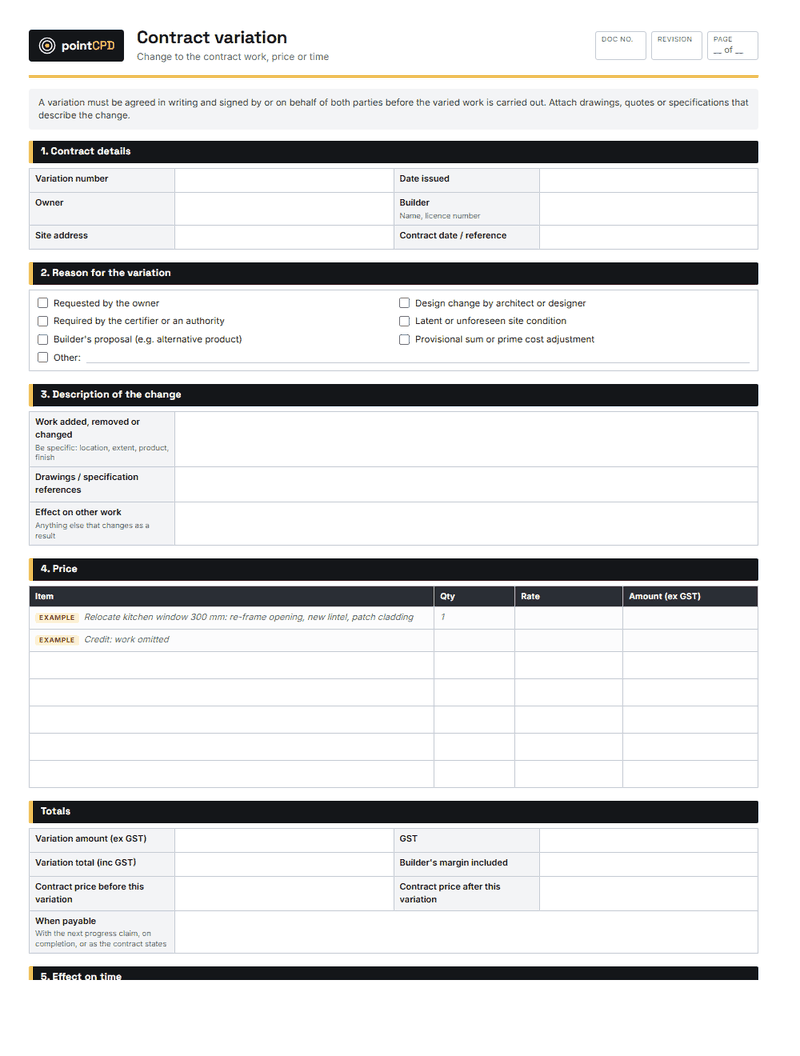
Variations are where many disputes start, usually because the paperwork was rushed or never done. Give an AI assistant your rough notes, such as “client wants to move kitchen window 600 to the left, need new lintel, re-order window, extra half day carpenter”, and ask it for a clear variation description. You still set the price and show how it was calculated, check it against your contract’s variation clause, and get it signed before doing the work. But the description will be clearer and quicker to produce.
2. Site diary entries from voice notes
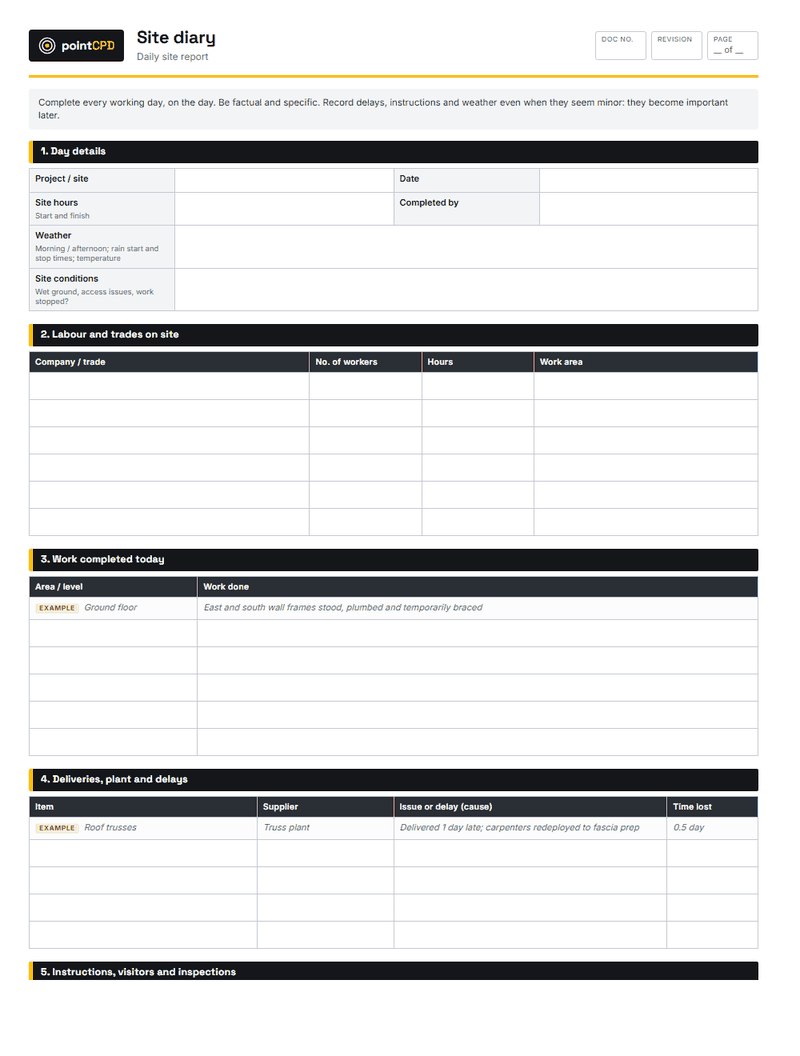
Many builders dictate notes into their phone at the end of the day. An AI tool can turn a rambling voice note into a tidy, dated diary entry: weather, trades on site, work done, deliveries, delays, instructions given and issues found. A consistent site diary is one of the most valuable records a builder can have in a dispute. Check the entry is accurate before saving it, because the diary is only useful if it is true.
3. Client update emails
Weekly client updates reduce anxious phone calls and set expectations. AI can turn a list of what happened this week into a friendly, professional email. It is also useful for difficult messages, such as a delay caused by weather or a supplier, where you want the tone to be calm and factual rather than defensive.
4. Summarising long specifications and tender documents
Commercial and multi-unit tender packages can run to hundreds of pages. AI can produce a summary of the key requirements, list the items that affect price, and flag unusual conditions. This is a genuine time saver for deciding whether to tender. But anything you price or build must be checked in the actual document. A summary that misses one onerous clause can cost more than the time it saved.
5. Structuring quotes
A good quote spells out inclusions, exclusions, assumptions, provisional sums and validity. AI can help turn your notes into a clear structure and suggest common exclusions you may have forgotten, such as rock excavation, council fees or service connections. The prices and the scope decisions are yours.
6. Tender responses and capability statements
For builders tendering to government, developers or commercial clients, AI helps draft methodology statements, project experience summaries and capability documents from your own material. Keep claims accurate and verifiable. An AI tool will happily describe your business in glowing, generic terms that a client can see through.
7. Meeting notes and action lists
Record a site meeting or a design meeting (with the agreement of the people present), transcribe it, and ask AI for a summary with decisions and action items. Circulate it to everyone who attended. Written minutes of who agreed to what, sent the same day, prevent a great many arguments.
8. Drafting a starting point for safety documents
AI can suggest hazards and controls for a task and lay out a safe work method statement or risk assessment. That can be a useful prompt for thinking. But a SWMS must describe the actual high-risk work on the actual site, the actual hazards and the actual controls, and it must be developed in consultation with the workers doing the work. A generic AI-written SWMS is exactly the kind of document regulators criticise. Treat AI as a checklist of things to consider, then write the document for the job.
9. Explaining a concept to a client
Clients often ask why something is needed: why the slab needs a vapour barrier, why the bathroom exhaust must be ducted outside, why the window they want does not meet the energy rating. AI is good at producing plain-English explanations you can adapt. Check the explanation is right before you send it.
10. Marketing and social media
Project write-ups for your website, social media captions, and descriptions for completed homes are routine work AI does well. Use real project details and your own photos, and avoid claims you cannot back up.
11. Bookkeeping and admin support
Many accounting and practice management tools now include AI features that categorise transactions, read receipts and invoices, and flag unusual items. These can save time, but the numbers still need to be reviewed by you or your bookkeeper, especially anything reported to the ATO.
12. Estimating and takeoff tools
Specialist estimating software increasingly uses AI to read plans and produce quantities. This is different from a general chat assistant: the tools are built for the task. They can speed up takeoffs considerably, but they can misread drawings, especially complex or poorly drawn ones. Treat automated quantities as a first pass to check, not as a final number.
Where AI helps a building business, and what to watch
| Task | What AI does well | What you must still do |
|---|---|---|
| Variations and client letters | Turns rough notes into a clear, polite document | Check scope, price, calculation and contract clause |
| Site diary | Converts voice notes into a tidy dated entry | Confirm the facts, times and names are right |
| Specification summaries | Pulls out key items from a long document | Read the actual spec for anything you price or build |
| Quotes and tenders | Structures inclusions, exclusions and assumptions | Set the prices and check every inclusion |
| Safety documents | Suggests hazards and a structure to start from | Make it job-specific, review, consult workers |
| Code questions | Explains concepts in plain words | Confirm every requirement in the NCC or standard itself |
The accuracy trap: codes, standards and numbers
The most dangerous use of AI in building is asking it what the rules say. Ask a general AI tool about a stair riser height, a balustrade requirement, a bushfire construction level or a wet area waterproofing detail, and it may give an answer that sounds exactly like the NCC. Sometimes it will be right. Sometimes it will quote an old edition, mix up states, or invent a clause number.
For a builder, the consequence of a wrong number is a non-compliant building. So the rule is absolute: any requirement that matters is checked in the source document, meaning the current NCC, the referenced Australian Standard, the approved plans, the engineer’s design or the manufacturer’s installation instructions. AI can help you understand what to look for. It cannot be the thing you rely on.
If AI gives you a clause number, check it. Precise-looking references are the most convincing kind of error. A wrong clause number in an RFI, a variation or a defect response undermines your credibility the moment someone checks it.
Privacy, confidentiality and ownership
When you paste text into an AI tool, it goes to the tool’s provider. Depending on the product and settings, it may be stored, reviewed or used to improve the service. That matters when the text includes clients’ personal information, contract terms, or plans and designs that belong to someone else.
Privacy law applies to personal information handled by many businesses, and your contracts may include confidentiality obligations. Before using an AI tool with real client material, check its terms and data settings, prefer business versions that do not use your data for training, and remove details the tool does not need.
Do not paste these into a public AI tool without checking its terms
- Clients’ personal details, phone numbers and addresses.
- Signed contracts and legal correspondence.
- Plans and designs that belong to the designer or client.
- Employee records, licences and health information.
- Bank details, passwords and account information.
- Anything you have promised to keep confidential.
Plans and designs are also someone’s intellectual property. Uploading a designer’s drawings to a third-party tool without permission may breach the terms under which you received them. Ask first, or use tools the designer and client have agreed to.
A safe routine for everyday use
A safe routine for using AI on a document
- 1Strip what you do not needRemove client names, addresses and prices unless the tool is approved for them.
- 2Give it contextTell it the job type, state and what the document is for. Better input, better draft.
- 3Ask for a draft, not an answerTreat the output as a first draft you will edit, not a finished document.
- 4Check every factNumbers, dates, clause references and prices are checked against the source.
- 5Own itYour name goes on it. Read it as if a client’s lawyer will.
A worked example: from voice note to variation
It helps to see what a good request looks like. A builder finishes a site meeting and dictates this into their phone:
“Mrs Smith wants the laundry door changed from a hinged door to a cavity slider. Frame’s already up so we need to pull out the studs, put in a cavity unit, re-do the architrave, and the electrician has to move the switch. Probably a day for the chippy, half a day for the sparky, plus the cavity unit and a new door.”
A weak request to an AI tool is: “Write a variation for this.” The result is usually generic and vague.
A strong request gives it the context: “You are helping a residential builder in NSW write a variation for a client. Write a clear description of the change in plain English, list the work involved, and leave placeholders for the price and calculation, which I will fill in. Note that the work will not proceed until the client signs. Here are my notes: …”
The second version produces a draft that reads professionally, describes the change clearly enough for the client to understand, and leaves the numbers to the builder. The builder then adds the price with its calculation, checks the wording against the contract’s variation clause, and sends it for signature before the carpenter touches the frame. Five minutes, instead of the variation that never gets written because the builder is too tired at the end of the day.
The same approach works for almost every document: tell the tool who you are, what the document is for, what it must include, and what it must not decide for you.
What it costs and how to start
Many general AI assistants have free versions, and paid business plans are typically a monthly subscription per user. Specialist construction software with AI features is usually priced as part of the software. The real cost is learning time: a few hours of experimenting with your own documents to see what works.
A practical way to start:
- Pick one repetitive document you write every week, such as client updates or site diary entries.
- Write a short set of instructions for the AI tool describing your business, your tone and what the document should include. Save it and reuse it.
- Use it for a month, checking every output before it is sent.
- Measure the time saved. If it works, add a second document type.
Where AI in construction is heading
AI features are being built into the software builders already use: estimating, scheduling, project management, accounting and site documentation. Over the next few years, expect tools that compare site photos against the plans, flag missing documents before a stage inspection, draft variations directly from change requests, and summarise a job’s risks from its diary and correspondence.
Governments are exploring AI too, including for processing applications. The direction is clear: more of the administrative load of building will be assisted by software. What will not change is accountability. The builder holds the licence, signs the contract and certifies the work. AI can make the paperwork faster. It cannot take the responsibility.
The bottom line
For a small building business, AI is best thought of as a fast, tireless junior who writes well and knows nothing about your job unless you tell it. Give it the drafting, the summarising and the tidying. Keep the facts, the prices, the compliance decisions and the final sign-off for yourself. Used that way, it gives back hours every week. Used any other way, it creates the kind of paperwork errors that end up in dispute resolution.
Questions builders ask
Can I use AI to answer NCC questions?
Use it to understand concepts, not as the authority. AI tools can quote wrong or outdated requirements and invent clause numbers. Always confirm a requirement in the current NCC, the referenced standard or the approved documents.
Can AI write my SWMS?
It can suggest hazards and a structure, but a SWMS must be specific to the actual high-risk work, site and controls, reviewed by someone competent, and developed in consultation with the workers doing the work.
Is it safe to paste client information into AI tools?
Check the tool’s terms and data settings first. Personal information and confidential contract details may be stored or used by the provider. Remove details the tool does not need and prefer business versions that do not train on your data.
What is the best first use of AI for a small builder?
A repetitive document you write every week, such as client update emails or site diary entries from voice notes. The time saving is immediate and the risk is low if you check each output.
Can AI do quantity takeoffs?
Specialist estimating software increasingly uses AI to read plans and produce quantities. Treat the results as a first pass to verify, especially on complex or unclear drawings.
Sources
- Safe work method statement for high risk construction work · Safe Work Australia
- Guidance on privacy and the use of commercially available AI products · Office of the Australian Information Commissioner
Published 5 August 2026. General information for builders, not legal, financial or engineering advice for a specific job. Check current requirements with the relevant regulator or standard before relying on them.