Key takeaways
- A connected system is only complete when the owner holds the credentials, the network details and the configuration record, because without them the system cannot be maintained, reset or reconnected by anyone other than the installer.
- Credentials, admin access and account ownership need to be transferred deliberately at handover, since a system left on the installer’s account leaves the owner dependent on a third party for basic control of their own home.
- The handover pack should record device locations, circuit and isolation points, and what each device controls, because a future tradesperson or certifier cannot infer any of it from the finished wall.
- Warranty entitlements on connected products depend on evidence of correct installation and commissioning, so the record you create at handover protects both the owner and your own position.
- Verbal walkthroughs do not survive a change of owner, a change of phone or a change of installer, so the information needs to be written down and stored somewhere the owner controls.
Most of the risk in a connected house is not created on the day the devices go in. It is created in the weeks afterwards, when something stops working, nobody can log in, and the owner rings you because you are the only person they have a number for.
Connected appliances and systems change the shape of handover. A conventional appliance is handed over when it is installed, tested and working. A connected appliance is handed over when the owner holds the means to operate, maintain and reconfigure it — and that is a documentation obligation as much as a physical one.
This article deals with the handover side: what you record, what you transfer, what you give the owner in writing, and where the commercial exposure sits when it is missing. Installation and rough-in decisions are a separate job and covered elsewhere.
Why connected systems fail at handover, not at installation
A hard-wired appliance that is installed correctly will generally keep working. A connected appliance depends on a chain of things that are not part of the building: a network, an account, a cloud service, a phone, and a configuration that someone chose during commissioning.
Every link in that chain can break without any trade doing anything wrong. The owner changes their internet provider and the network name changes. The installer’s account, which the devices were registered to, gets closed when the installer retires or the business changes hands. A password is stored only in someone’s phone. A scene that runs the house at night is deleted when an app is reinstalled.
None of these are defects in the building work in the ordinary sense. They are information failures. They surface months or years after practical completion, they are almost always blamed on the builder first, and they are expensive to resolve because the knowledge needed to fix them has to be rebuilt from scratch.
Credentials and account ownership: the part owners never think to ask about
The single most common problem in a connected house is that the owner does not own the account the system runs on. It is normal during construction for devices to be registered to the electrician’s or the AV contractor’s account, because that is the fastest way to commission them. It is not acceptable to leave them there.
What the owner needs at handover is administrative control, not just a login that works today. That means the account that owns the devices is in the owner’s name, on the owner’s email address, with the owner able to reset the password without going through you. Where the manufacturer or platform supports transferring an existing account or adding an administrator, that transfer should be done explicitly and confirmed in front of the owner.
This matters commercially because of what happens later. If the owner cannot administer the system, every trivial change becomes a service call to a contractor who may no longer be trading, may no longer have the account, or may simply be unavailable. The owner will escalate to you, and you will be negotiating from a position where you have no access and no record.
What to transfer, and how to prove it
- The account that owns each device or service, moved to the owner’s name and email address.
- Administrator access on any hub, controller or gateway in the house.
- Network credentials for the network the devices use, given to the owner in writing.
- A written record of what was transferred, dated, and acknowledged by the owner.
The acknowledgement is the part most builders skip. It is also the part that ends the argument later, because it establishes that the transfer happened and that the owner had the opportunity to test it.
The configuration record is part of the building record
When a system is commissioned, someone makes a series of decisions: which device is called what, which circuits sit behind which relay, which devices are grouped, what happens on a schedule, what the fallback behaviour is if the network drops out. Those decisions are invisible in the finished house. They exist only in an app.
That is a problem for anyone who comes after you. A later electrician tracing a fault, a certifier inspecting an installation, an insurer assessing a claim, or a new owner taking over the house all need to know what was configured and why. None of it can be inferred from looking at a wall.
The practical solution is to treat the configuration as part of the record you already keep. If you are already photographing services before linings go on, the same discipline extends to the connected systems: screenshots or exports of the configuration, a device schedule, and photographs of the installed equipment in place. The article on site photo record keeping as evidence covers the general approach, and connected systems simply become another item on that list.
Where a system allows the configuration to be exported to a file, export it and keep a copy with the project records. Where it does not, screenshots are adequate. What matters is that the information exists somewhere other than in one person’s memory.
Isolation, labelling and the trades who follow you
Connected equipment is often hard-wired, and hard-wired equipment needs to be isolatable by someone who did not install it. An electrician called out in an emergency should be able to identify the circuit, isolate the equipment and work on it safely without dismantling half a cupboard.
This is a safety point before it is a documentation point, but the two are connected. Labelling at the switchboard, identification of any local isolation, and a note in the handover pack explaining what each isolation point serves all reduce the chance that a future tradesperson makes an assumption and gets it wrong.
The same applies to the plumbing side where connected appliances are involved. A connected hot water system, a smart irrigation controller or a wifi-linked pool pump all have isolation requirements that the owner needs to understand, and the owner needs to know which device does what before they start switching things off.
Pool and spa controls sit in their own category
Where a connected system touches a pool or spa, the handover obligation gets more serious, because pool and spa safety obligations sit with the owner from the moment they take possession and are not discharged by the builder handing over a working pump.
An owner taking on a pool or spa needs to understand their ongoing obligations, which the NSW Government sets out in its guidance on owning a pool or spa and the obligations that come with it. Those obligations are separate from the building work, but the handover is the moment the owner becomes responsible for them, and it is the moment to make sure they know.
It is also worth being clear about what the builder’s own obligations are during construction where a pool is involved, which the NSW Government covers in its material on building a pool and the rights and obligations that apply. Where a connected controller operates a pool pump, a heater or a cover, the owner needs to know how to take manual control if the network or the app is unavailable, because a safety barrier or a pump that only works through an app is a problem waiting to happen.
Warranty position and why the record protects you
Connected products carry manufacturer warranties, and those warranties almost always require evidence that the product was installed and commissioned in accordance with the manufacturer’s instructions. When a device fails and the owner claims, the first thing the manufacturer asks for is that evidence.
If you have kept a commissioning record — what was tested, when, and by whom — the claim is straightforward. If you have not, the claim becomes an argument, and in the meantime the owner is without a working appliance and is looking at you. The cost of a disputed warranty claim is rarely the part itself. It is the labour, the return visits, the replacement of a device that was supplied at a price the owner now disputes, and the relationship damage that follows.
There is a second, less obvious exposure. Where a connected system was supplied and installed by a subcontractor who is no longer contactable, the owner will treat the builder as the point of contact for everything. Having a complete record lets you respond usefully rather than defensively, and it lets you demonstrate that the installation was done properly at the time.
Payments and record keeping you may already be doing
Builders who engage subcontractors should also be aware of the record keeping obligations that sit outside the building contract. Payments to contractors for building and construction services may need to be reported to the Australian Taxation Office, and the ATO sets out which payments need to be reported in a Taxable Payments Annual Report. This is separate from handover, but it reinforces the same habit: the project record is a commercial asset, and connected systems are part of it.
What belongs in the handover pack
- Device schedule listing each connected appliance, its location and what it controls.
- Network details: the SSID the devices use and where the credentials are stored.
- App and account details, including which account owns each device and service.
- Isolation points and circuit identification for hard-wired connected equipment.
- Manufacturer documentation, warranty terms and the commissioning record for each product.
- The configuration record: scenes, schedules, groupings and any settings changed from default.
- A short note on what the owner must not change without advice, and why.
What actually goes in the handover pack
The handover pack for a connected house is not a thick document. It is a short, specific set of records that answers the questions someone will ask in two years.
Start with a device schedule. For each connected appliance or system, record what it is, where it is, what it controls, and how it is powered or isolated. Then record the network details the devices depend on, the accounts that own them, and the configuration that was set at commissioning. Then attach the manufacturer documentation, the warranty terms, and your commissioning record.
Finally, add a short note on what the owner should not change without advice and why. If a particular setting is load-bearing — a schedule that keeps a pump running, a fallback that keeps a barrier closed — say so plainly. An owner who understands why a setting matters is far less likely to break it, and far less likely to blame you when they do.
Worked example: a builder in western Sydney
A builder in western Sydney completes a new home with a connected package: a heat pump hot water system, ducted air conditioning, a solar and battery system, a wifi irrigation controller and a pool pump with a connected controller. The electrical subcontractor commissions everything on his own manufacturer accounts because it is quicker, and hands the builder a folder of manuals at practical completion.
The builder hands the folder to the owner, walks them through the app on the electrician’s phone, and takes a signed handover acknowledgement that covers the building work. Practical completion is reached, final payment is made, and the file is closed.
Eighteen months later the electrician closes his business. The owner’s phone is replaced and the irrigation controller will not reconnect, because the network details were never written down and the app is tied to an account the owner cannot access. The pool controller loses its schedule during a power outage and the owner cannot work out how to restore it. The owner contacts the builder, who no longer has access to any of it and cannot get the electrician on the phone.
Resolving it means a new contractor attending, identifying every device, re-registering what can be re-registered, and rebuilding a configuration nobody recorded. The cost lands on the builder, because the owner has a reasonable expectation that they were given what they needed to run the house. The commercial lesson is not that the electrician was careless. It is that the handover pack was never built, and the builder owned the handover.
Handover sequence for connected systems
- 1Commission and confirm operationRun every connected device through its full operating cycle before the owner is on site, and record what was tested.
- 2Capture the configuration recordPhotograph or export the settings, device names, network details and control groupings while you still have access.
- 3Transfer ownership and administrationMove app accounts, hubs and cloud services from your business to the owner, and confirm the owner can log in.
- 4Walk through with the owner presentDemonstrate each system, show the isolation points, and let the owner operate it themselves.
- 5Issue the handover pack and get a receiptProvide the written pack, list the credentials in it, and record that it was received.
Running handover so it holds up later
The sequence matters. Commission and test everything while you still have full access. Capture the configuration while you can still see it. Transfer ownership deliberately, with the owner present, and confirm they can log in and reset a password themselves. Then demonstrate the systems, show the isolation points, and hand over the written pack.
Get a receipt for the pack, not just a signature on a practical completion certificate. The receipt is what establishes that the information was provided, and it is the document you will want if a dispute arises about something the owner says they were never told.
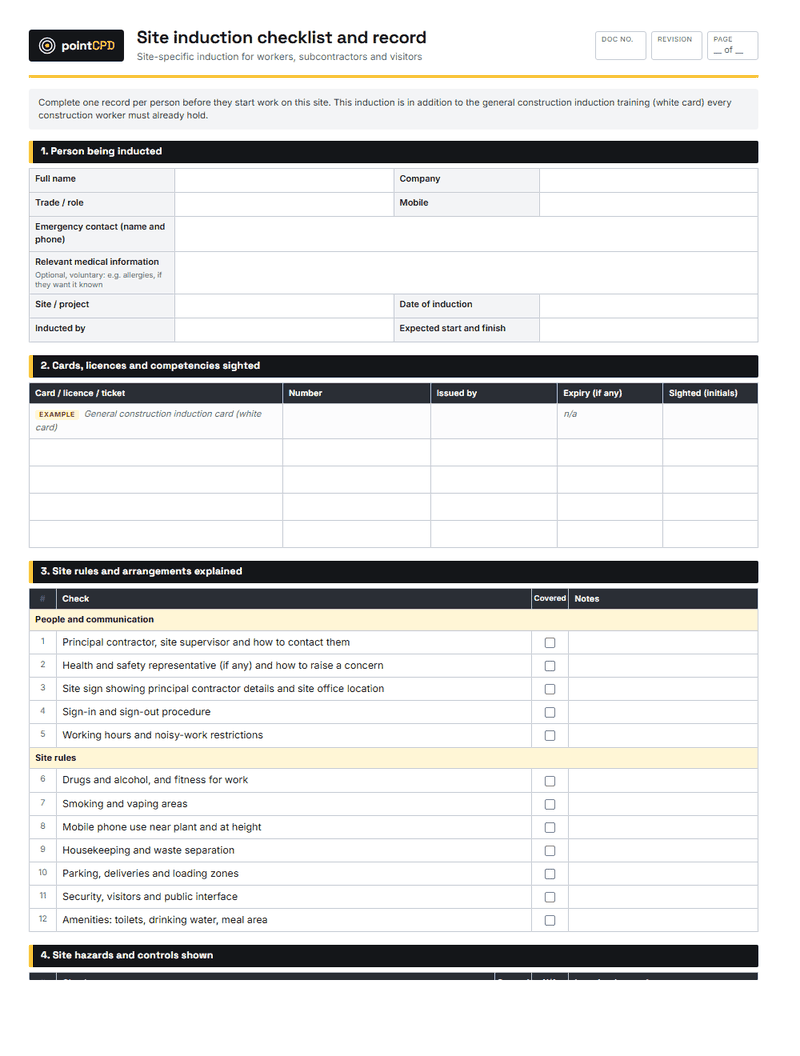
If you use standard templates for site processes, the same approach works here: a simple, repeatable checklist that gets completed on every job is worth more than a comprehensive document that gets completed on none. The free site induction checklist template is a useful model for how short a working checklist can be, and a connected systems handover checklist should be no longer.
For builders who want to go further into the technology side of these projects, the article on smart home wiring rough-in decisions covers the choices that get made much earlier and constrain what is possible at handover. Getting the rough-in right makes the handover pack shorter and simpler, because there are fewer workarounds to explain.
Where this fits in your CPD
Handover obligations, documentation standards and the way connected technology changes what a builder is responsible for all sit within the technical and compliance content that counts toward your ongoing development. The guide to how NSW builder CPD works explains the categories and the record keeping that applies to your own hours.
The practical reason to treat this as more than a box-ticking exercise is that connected systems are becoming standard rather than optional, and the failure mode is predictable. Builders who build a handover pack as a matter of course stop getting the calls eighteen months later. Builders who do not, keep paying for the same problem on every project.
Questions builders ask
Who should own the smart home accounts after handover?
The owner should own every account the system depends on, in their own name and on their own email address, with the ability to reset the password without going through you or a subcontractor. During construction it is common for devices to be commissioned on a trade’s account, and that is fine as long as the ownership is transferred explicitly at handover. Confirm the transfer in front of the owner and record that it happened.
What should be in a smart home handover pack?
A device schedule listing each connected appliance, its location and what it controls; the network details the devices use; the accounts that own each device or service; isolation points and circuit identification for hard-wired equipment; manufacturer documentation and warranty terms; and the configuration record showing scenes, schedules and groupings. Add a short note on any settings the owner should not change without advice.
Do I need to hand over the network password?
Yes, in writing. If the connected devices run on a network the owner does not have credentials for, the owner cannot reconnect anything, cannot add a device, and cannot diagnose a fault. Give the network name and the credentials in the handover pack, and make sure the owner knows which network the devices depend on, particularly where there is more than one.
What happens if the owner cannot access the system after handover?
In practice the builder absorbs the cost of resolving it, because the owner reasonably expects to be given what they need to run the house. If the original installer is no longer contactable or no longer holds the account, a new contractor has to identify every device, re-register what can be re-registered, and rebuild a configuration nobody recorded. That is expensive and entirely avoidable.
Does a verbal walkthrough at handover protect me?
No. A verbal walkthrough does not survive a change of phone, a change of owner or a change of installer. What protects you is a written pack, a record that it was provided, and an acknowledgement from the owner that they received it. The walkthrough is still worth doing, because it lets the owner operate the system themselves while you are there to correct them.
Do connected pool or spa controls change the handover?
They raise the stakes, because pool and spa safety obligations sit with the owner from the moment they take possession. The owner needs to know how to take manual control of a pump, heater or cover if the app or the network is unavailable, and they need to understand the ongoing obligations that come with owning a pool or spa. Do not assume the app makes any of that self-explanatory.
Sources
- Building a pool: your rights and obligations · NSW Government
- Owning a pool or spa: your obligations · NSW Government · 2026-03-16
- Payments businesses need to report in their TPAR · Australian Taxation Office
Published 21 July 2026. General information for builders, not legal, financial or engineering advice for a specific job. Check current requirements with the relevant regulator or standard before relying on them.